Know when someone gets into your server.
sshsentry watches your SSH auth log, /etc/passwd and authorized_keys, and tells you in plain English when something matters. Built for small businesses and homelabs, not enterprise fleets.
pip install sshsentry
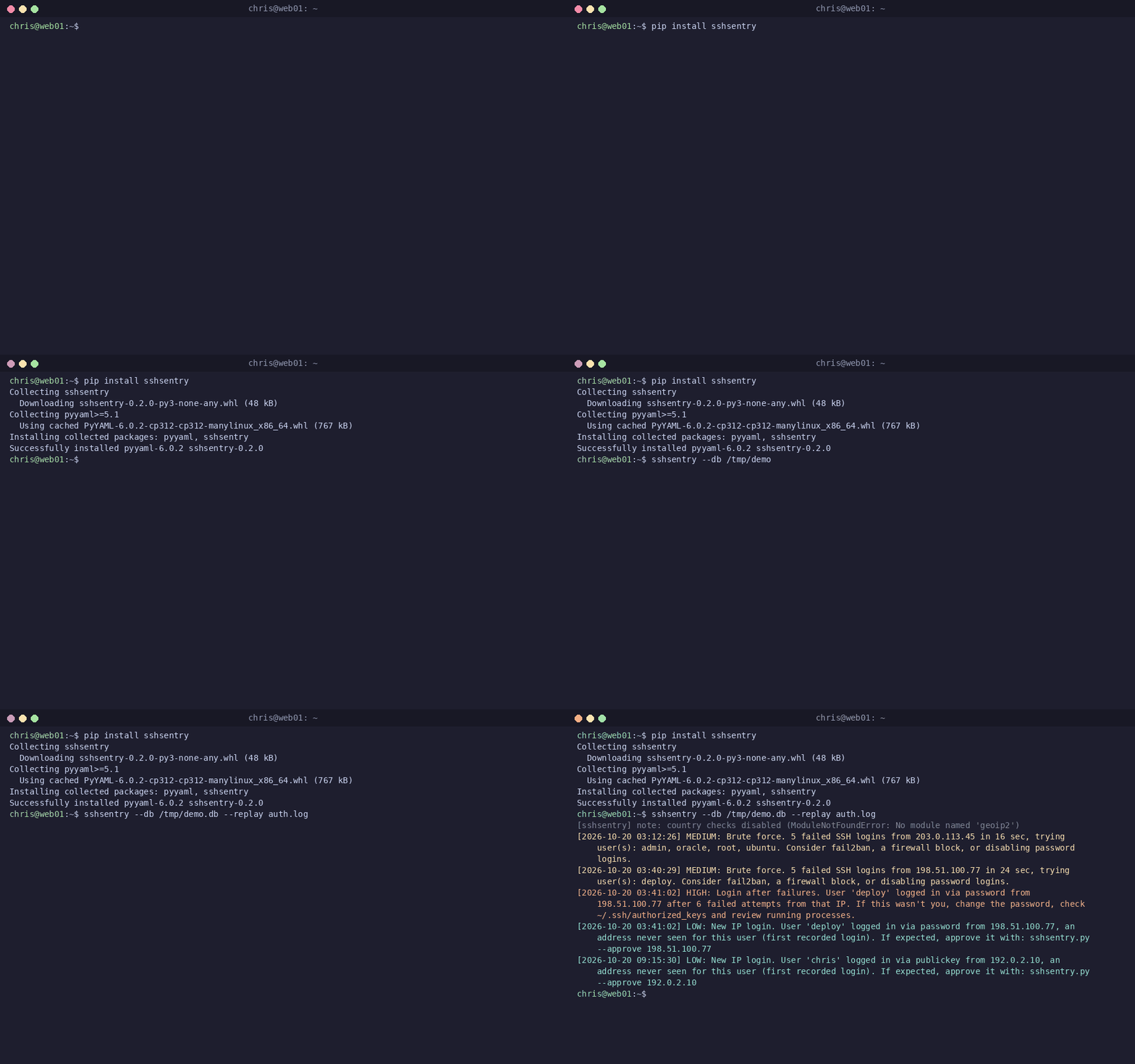
Real output, no setup
This is sshsentry replaying the sample log that ships in the repo. Every alert says what happened, who, from where, and what to check next. Replay never sends anything anywhere.
pip install sshsentrycurl -sO https://raw.githubusercontent.com/sshsentry/sshsentry/main/sample-auth.logsshsentry --db /tmp/sshsentry-try.db --replay sample-auth.log --digest-now # prints alerts, sends nothing
The animation shows real tool output; the install lines in it are simulated.
What it notices
Seven rules, all on by default, all tunable in sshsentry.yaml. Repeats are muted for cooldown_minutes (60).
Brute force MEDIUM
5+ failed logins from one IP within a sliding 10 minutes. Invalid usernames count too, so key-only servers are covered.
Login after failures HIGH
A successful login from an IP that failed 5+ times in the last 60 minutes. This is the one you really want to hear about.
Escalation CRITICAL
With alerting turned on, an IP already alerted for brute force that later logs in gets one CRITICAL alert to every destination. It replaces the login-after-failures alert for that login.
New country HIGH
A successful login from a country never seen for that user. Needs the optional geoip2 library and a free MaxMind GeoLite2-Country database; skipped with a one-line note if missing.
New IP LOW
A successful login from an IP never seen for that user. Approve your own addresses with --approve IP.
New user HIGH
A new account appears in /etc/passwd. Existing accounts are recorded silently on the first run.
New SSH key HIGH
A new line in any watched authorized_keys file (root and /home/* by default, globs allowed). Existing keys are the silent baseline.
Three steps
Install one script
pip install sshsentry, or copy sshsentry.py to the server. Python 3.9+ and PyYAML. No agent fleet, no database server, no dashboard.
It learns what is normal
The first run is quiet. Existing users and keys become the baseline, and the existing log teaches it which IPs each user normally uses.
You get plain-English alerts
On stdout (journald under systemd), and optionally by email, Slack or a webhook, plus an optional daily digest.
Pairs with fail2ban
sshsentry does not block anything. It reads logs and files and tells you what it saw. fail2ban (or your firewall) does the blocking. Together: fail2ban slows the guessing, sshsentry tells you when a guess worked, or when a new user or key appears that fail2ban was never designed to notice.
No. It reads the auth log,
/etc/passwd and authorized_keys, and writes only its own SQLite state file (and optional digest text files). Nothing leaves the machine unless you turn on alerts or opt-in sharing.Share configs and attack patterns
Configs
Share your sshsentry.yaml thresholds and learn-mode suggestions, and compare with others.
Attack patterns
Post (redacted) log samples of what you saw and what helped.
Issues & contributing
Bugs, parser gaps, docs fixes. Security issues: email sshsentry@gmail.com privately.
Before posting, remove your server IPs, hostnames, usernames, email addresses, webhook URLs and tokens.